This website uses cookies
We use cookies to personalise content and ads, to provide social media features and to analyse our traffic. We also share information about your use of our site with our social media, advertising and analytics partners who may combine it with other information that you’ve provided to them or that they’ve collected from your use of their services.
Consent Selection
Details
  • Necessary cookies help make a website usable by enabling basic functions like page navigation and access to secure areas of the website. The website cannot function properly without these cookies.
    • Learn more about this provideropens in a new window
      CookieConsentStores the user's cookie consent state for the current domain
      Maximum Storage Duration: 1 yearType: HTTP Cookie
    • Learn more about this provideropens in a new window

      Some of the data collected by this provider is for the purposes of personalization and measuring advertising effectiveness. The provider may use the IP Addresses for ads measurement and ads personalization.

      test_cookieUsed to check if the user's browser supports cookies.
      Maximum Storage Duration: 1 dayType: HTTP Cookie
      rc::aThis cookie is used to distinguish between humans and bots. This is beneficial for the website, in order to make valid reports on the use of their website.
      Maximum Storage Duration: PersistentType: HTML Local Storage
      rc::cThis cookie is used to distinguish between humans and bots.
      Maximum Storage Duration: SessionType: HTML Local Storage
    • Learn more about this provideropens in a new window
      __cf_bmThis cookie is used to distinguish between humans and bots. This is beneficial for the website, in order to make valid reports on the use of their website.
      Maximum Storage Duration: 1 dayType: HTTP Cookie
      cf_clearanceThis cookie is used to distinguish between humans and bots.
      Maximum Storage Duration: 1 yearType: HTTP Cookie
  • Preference cookies enable a website to remember information that changes the way the website behaves or looks, like your preferred language or the region that you are in.
    • We do not use cookies of this type.

  • Statistic cookies help website owners to understand how visitors interact with websites by collecting and reporting information anonymously.
    • Learn more about this provideropens in a new window
      p.gifKeeps track of special fonts used on the website for internal analysis. The cookie does not register any visitor data.
      Maximum Storage Duration: SessionType: Pixel Tracker
    • Learn more about this provideropens in a new window
      cusid [x2]This cookie is used to identify the frequency of visits and how long the visitor is on the website.
      Maximum Storage Duration: 1 dayType: HTTP Cookie
      cuvonThis cookie is used to determine when the visitor last entered the different subpages on the website.
      Maximum Storage Duration: 1 dayType: HTTP Cookie
    • Learn more about this provideropens in a new window
      c.gifCollects data on the user’s navigation and behavior on the website. This is used to compile statistical reports and heatmaps for the website owner.
      Maximum Storage Duration: SessionType: Pixel Tracker
      _clckCollects data on the user’s navigation and behavior on the website. This is used to compile statistical reports and heatmaps for the website owner.
      Maximum Storage Duration: 1 yearType: HTTP Cookie
      _clsk [x2]Registers statistical data on users' behaviour on the website. Used for internal analytics by the website operator.
      Maximum Storage Duration: 1 dayType: HTTP Cookie
      _cltkRegisters statistical data on users' behaviour on the website. Used for internal analytics by the website operator.
      Maximum Storage Duration: SessionType: HTML Local Storage
  • Marketing cookies are used to track visitors across websites. The intention is to display ads that are relevant and engaging for the individual user and thereby more valuable for publishers and third party advertisers.
    • Learn more about this provideropens in a new window

      Some of the data collected by this provider is for the purposes of personalization and measuring advertising effectiveness. The provider may use the IP Addresses for ads measurement and ads personalization.

      pagead/1p-user-list/#Tracks if the user has shown interest in specific products or events across multiple websites and detects how the user navigates between sites. This is used for measurement of advertisement efforts and facilitates payment of referral-fees between websites.
      Maximum Storage Duration: SessionType: Pixel Tracker
      _gaUsed to send data to Google Analytics about the visitor's device and behavior. Tracks the visitor across devices and marketing channels.
      Maximum Storage Duration: 2 yearsType: HTTP Cookie
      _ga_#Used to send data to Google Analytics about the visitor's device and behavior. Tracks the visitor across devices and marketing channels.
      Maximum Storage Duration: 2 yearsType: HTTP Cookie
      _gcl_auUsed to measure the efficiency of the website’s advertisement efforts, by collecting data on the conversion rate of the website’s ads across multiple websites.
      Maximum Storage Duration: 3 monthsType: HTTP Cookie
      _gcl_lsTracks the conversion rate between the user and the advertisement banners on the website - This serves to optimise the relevance of the advertisements on the website.
      Maximum Storage Duration: PersistentType: HTML Local Storage
    • Learn more about this provideropens in a new window
      MR [x2]Used to track visitors on multiple websites, in order to present relevant advertisement based on the visitor's preferences.
      Maximum Storage Duration: 7 daysType: HTTP Cookie
      MUID [x2]Used widely by Microsoft as a unique user ID. The cookie enables user tracking by synchronising the ID across many Microsoft domains.
      Maximum Storage Duration: 1 yearType: HTTP Cookie
      SRM_BTracks the user’s interaction with the website’s search-bar-function. This data can be used to present the user with relevant products or services.
      Maximum Storage Duration: 1 yearType: HTTP Cookie
      ANONCHKRegisters data on visitors from multiple visits and on multiple websites. This information is used to measure the efficiency of advertisement on websites.
      Maximum Storage Duration: 1 dayType: HTTP Cookie
      SMRegisters a unique ID that identifies the user's device during return visits across websites that use the same ad network. The ID is used to allow targeted ads.
      Maximum Storage Duration: SessionType: HTTP Cookie
    • Learn more about this provideropens in a new window
      suidCollects information on user preferences and/or interaction with web-campaign content - This is used on CRM-campaign-platform used by website owners for promoting events or products.
      Maximum Storage Duration: 1 yearType: HTTP Cookie
      suid_legacyCollects information on user preferences and/or interaction with web-campaign content - This is used on CRM-campaign-platform used by website owners for promoting events or products.
      Maximum Storage Duration: 1 yearType: HTTP Cookie
    • Learn more about this provideropens in a new window
      __cf_obPending
      Maximum Storage Duration: SessionType: HTTP Cookie
      _cfPre_tabIdPending
      Maximum Storage Duration: SessionType: HTML Local Storage
    • Learn more about this provideropens in a new window
      __Secure-ROLLOUT_TOKENUsed to track user’s interaction with embedded content.
      Maximum Storage Duration: 180 daysType: HTTP Cookie
      __Secure-YECStores the user's video player preferences using embedded YouTube video
      Maximum Storage Duration: SessionType: HTTP Cookie
      __Secure-YNIDUsed to track user’s interaction with embedded content.
      Maximum Storage Duration: 180 daysType: HTTP Cookie
      LAST_RESULT_ENTRY_KEYUsed to track user’s interaction with embedded content.
      Maximum Storage Duration: SessionType: HTTP Cookie
      LogsDatabaseV2:V#||LogsRequestsStoreUsed to track user’s interaction with embedded content.
      Maximum Storage Duration: PersistentType: IndexedDB
      ServiceWorkerLogsDatabase#SWHealthLogNecessary for the implementation and functionality of YouTube video-content on the website.
      Maximum Storage Duration: PersistentType: IndexedDB
      TESTCOOKIESENABLEDUsed to track user’s interaction with embedded content.
      Maximum Storage Duration: 1 dayType: HTTP Cookie
      VISITOR_INFO1_LIVETries to estimate the users' bandwidth on pages with integrated YouTube videos.
      Maximum Storage Duration: 180 daysType: HTTP Cookie
      YSCRegisters a unique ID to keep statistics of what videos from YouTube the user has seen.
      Maximum Storage Duration: SessionType: HTTP Cookie
      yt-icons-last-purgedNecessary for the implementation and functionality of YouTube video-content on the website.
      Maximum Storage Duration: PersistentType: HTML Local Storage
      ytidb::LAST_RESULT_ENTRY_KEYUsed to track user’s interaction with embedded content.
      Maximum Storage Duration: PersistentType: HTML Local Storage
      YtIdbMeta#databasesUsed to track user’s interaction with embedded content.
      Maximum Storage Duration: PersistentType: IndexedDB
  • Unclassified cookies are cookies that we are in the process of classifying, together with the providers of individual cookies.
    • matrix_last_commercial_productPending
      Maximum Storage Duration: SessionType: HTML Local Storage
Cookie declaration last updated on 9/30/26 by Cookiebot
[#IABV2_TITLE#]
[#IABV2_BODY_INTRO#]
[#IABV2_BODY_LEGITIMATE_INTEREST_INTRO#]
[#IABV2_BODY_PREFERENCE_INTRO#]
[#IABV2_BODY_PURPOSES_INTRO#]
[#IABV2_BODY_PURPOSES#]
[#IABV2_BODY_FEATURES_INTRO#]
[#IABV2_BODY_FEATURES#]
[#IABV2_BODY_PARTNERS_INTRO#]
[#IABV2_BODY_PARTNERS#]
About
Cookies are small text files that can be used by websites to make a user's experience more efficient.

The law states that we can store cookies on your device if they are strictly necessary for the operation of this site. For all other types of cookies we need your permission.

This site uses different types of cookies. Some cookies are placed by third party services that appear on our pages.

You can at any time change or withdraw your consent from the Cookie Declaration on our website.

Learn more about who we are, how you can contact us and how we process personal data in our Privacy Policy.

Please state your consent ID and date when you contact us regarding your consent.

Touch / Touch XL: Guide to Enhancing Exercise Experience

January 28, 2026

Exercisers want more than just a workout; they want engaging experiences. This tutorial walks you through how to transform everyday cardio sessions into immersive, motivating journeys using interactive programs, customizable console features and wearable or other device integration. From Matrix proprietary training programs like high-intensity Sprint 8 to globally-inspired workouts with Virtual Active and Landmarks, you’ll learn how to keep members engaged, challenged and coming back for more.

The guide also covers practical setup tips, including changing featured workouts, adding custom apps, and how to help your exercisers enhance their experience, including pairing personal devices and saving workout data for long-term progress tracking.

Whether you’re enhancing motivation, personalization or performance, this tutorial shows how to get the most out of Touch / Touch XL Console interactive fitness technology.

SHOWCASE INTERACTIVE WORKOUTS

Interactive workouts make cardio sessions more engaging and fun, which helps boost motivation and consistency. By incorporating challenging programs or even virtual environments, you make every workout a fresh and unique experience.

SPRINT 8

Introduce your members to our exclusive Sprint 8 program, developed specifically to give them results that keep them coming back. Sprint 8 is a scientifically validated program that uses high-intensity exercise to stimulate natural human growth hormone, efficiently burning fat and building muscle.

IFIT

Your members will be able to access an extensive range of immersive, interactive workouts, plus high-energy Live Workouts that are available every day. Exciting iFIT programming on the consoles will make users feel like they’re taking part in a studio class on their own schedule.

VIRTUAL ACTIVE

Transport exercise enthusiasts to exotic locales all over the world. The beautiful forward motion, high-definition footage speeds up or slows down to match the user’s pace, and resistance or incline varies to match the terrain. Users can select a Guided Workout for instruction and encouragement for a more effective exercise experience. When it comes to the most immersive workout available, nothing can take your members on a journey like Virtual Active.

LANDMARKS

Add challenge, motivation and interest to ClimbMill workouts with more than 20 globe-spanning, exhilarating journeys to the top of natural and man- made wonders of the world. Each destination includes stunning photography and quick-read information that can help members broaden their worldly knowledge every time they load the program.

HIIT

Deliver a performance-driven experience in group class setting or for individual exercisers with a fully customizable interval training program for high intensity workouts. Users can set three quick-access intensity levels, allowing for rapid adjustments of speed and incline throughout sessions. Creating a custom HIIT workout is intuitive for both staff and members. Workouts can also be saved for consistent use across programs or classes.

CHANGE DEFAULT DISPLAYED WORKOUT

  1. Press and hold the Matrix (or custom) logo for five seconds to display the Product Dashboard.
  2. Press the “Engineering Mode” button.
  3. Enter “3001” on the keypad to access the Machine Settings menu.
  4. Touch ‘Workout’ on the left navigation menu.
  5. Scroll to the bottom of the page and select an available workout from the dropdown list.
  6. Do this for Featured Workout 1, Featured Workout 2, and/or Featured Workout 3.
  7. There is an illustration that shows the display position of Featured Workout 1 (left), Featured Workout 2 (center) and Featured Workout 3 (right).

Note: Only available workouts will be in the dropdown list.
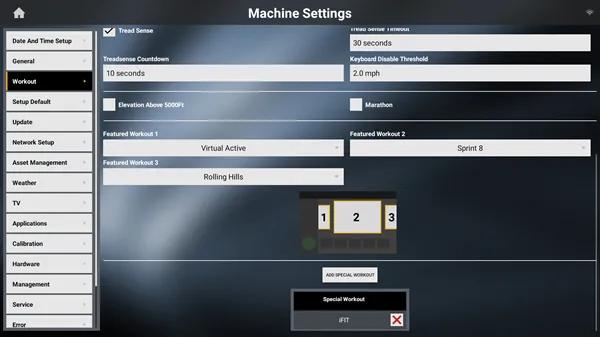
Machine Setting screen on the Matrix Touch Console

ADD A CUSTOM APP

Create a custom web app to provide exercisers with a shortcut to any website that they can access directly on the console. You can customize the app icon and name, streamlining their experience as it looks like any other app available to them.

FIRST, ON A USB

  1. On the root folder of a blank USB, create a new folder named custom_app. The USB needs to be a version 2.0 with FAT32 file system formatting.
  2. Create an app icon (what users will touch to open the custom app). It should be a square, 512 x 512 pixel .png or .jpg image.
  3. Place the app icon image in the custom_app folder.

NEXT, ON THE CONSOLE

  1. Insert the USB in the port on the console.
  2. Press and hold the Matrix (or custom) logo for five seconds to display the Product Dashboard.
  3. Touch ‘Machine Settings’ and enter ‘3001’ to access ‘Service Mode.’
  4. Touch the ‘Asset Management’ button on the left navigation menu.
  5. Scroll to the bottom and enter the app name in the ‘Custom App Name’ field.
  6. Type the URL in the ‘Custom App URL’ field.
  7. Press ‘Upload Custom Icon’ to upload the app icon image.
  8. Touch the home icon in the upper-left corner of the screen to save.

INSTRUCTING USERS: PAIRING DEVICES

Keep exercisers fully immersed in their workout with seamless integration of music, real-time performance tracking data and personalized feedback. Matrix Touch / Touch XL Consoles allow simultaneous pairing of up to three types of personal devices, including smartphones, headphones and heart rate tracking devices.

  1. Log into the console, either as a guest or with your xID.
  2. Press the gear icon at the top right corner of the screen.
  3. Select the button that says Device Pairing with the gear icon.
  4. Choose from available devices.
  5. On the FTMS page, you’ll see the machine name that you’ll be able to select on your device.
  6. Once devices are paired, press the back arrow to return to the workout selection.
  7. Select the MyMedia app to play audio from paired devices.
  8. To unpair your devices, press the gear icon and select Bluetooth Pairing.
  9. Click the device and confirm unpairing.
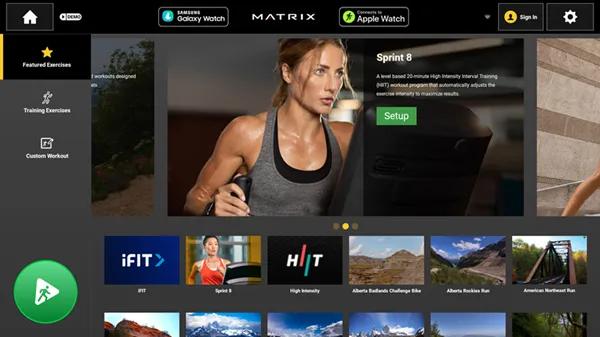
Main screen on the Matrix Touch Console

INSTRUCTING USERS: SAVING WORKOUT DATA

Access to this information opens so many possibilities for facilities and exercisers alike. Whether it’s creating a bespoke plan for the exerciser to adjust for better results or identifying patterns and then optimizing based on data. Go beyond simply saving workout data. Using the Community 360 app, your members can access enhanced tracking, goal setting and customizable experiences.

CREATE AN XID

  1. Click the person icon in the top left corner of the console.
  2. Click the “Register” option and fill out the required information.

SIGN IN TO XID

  1. Sign in to xID during each workout to track workout stats.
  2. Click workout history on the console screen.
  3. Select which view you want to see.
  4. Scroll to find the day you want to review where you can see the amount of calories burned, time spent and distance traveled.
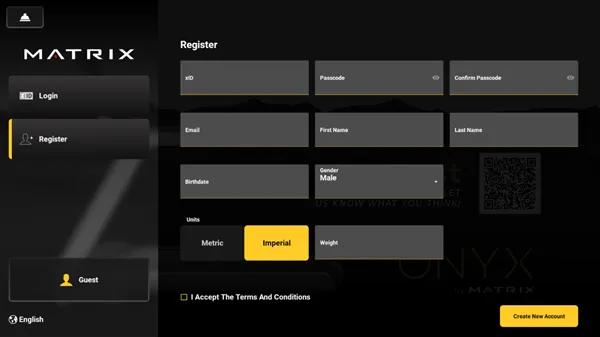
Registration screen on the Matrix Touch Console